
Control how your grid displays navigation and category filters for improved user experience.
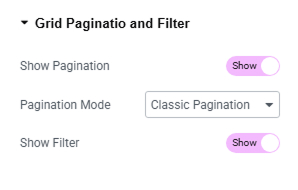
Settings Overview #
| Setting | Description |
|---|---|
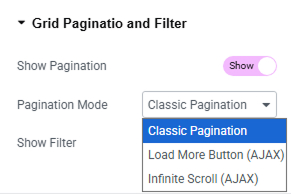
| Show Pagination | Enable this option to display pagination at the bottom of your grid. You can choose from three pagination types: Classic Pagination, Load More Button (AJAX), or Infinite Scroll (AJAX) to control how posts are loaded and navigated. |
| Show Filter | Enable this to display category-based filters above the grid. Visitors can then filter posts by category without reloading the page. |
How to Use Pagination Options #
Enable Show Pagination to display pagination controls below the grid.
Select a Pagination Mode based on your preference:
- Classic Pagination – Shows numbered pages for traditional navigation.
- Load More Button (AJAX) – Loads more posts when the user clicks the button.
- Infinite Scroll (AJAX) – Automatically loads posts as the user scrolls down.
Save the settings and preview your grid on the frontend.
Tips #
Use pagination if you’re showing a large number of posts and want to avoid long scrolls.
Use filters when posts span multiple categories and you want quick sorting for users.
Both options can be used together or individually, depending on your layout needs.


